Studio 0.1
Studio, the AI creative studio inside your social media manager
Clautia is the agentic social media manager, and Studio is its AI creative studio: the place where you create AI images for your posts. Describe what you want, pick a quality with the price in view, and the image lands in Media, ready for a post you schedule from the same calendar. Every plan includes images each month.
Updated November 22, 2026


Problems Clautia helps you solve
The image lives in another tool
You generate it on one site, download it, upload it to your scheduler and attach it by hand. That is four steps per post that add nothing.
You never know what an image costs
Many generators charge in tokens or credits that do not map to anything clear. You find out what you spent once the balance has already dropped.
The post goes out tomorrow and there is no photo
The caption is written, but the image is missing. You end up reusing a photo you already posted, or pushing the post back.
The networks worth publishing on
Instagram
Images come out vertical 3:4, one of the shapes the Instagram feed accepts, and reach the post without going through your phone.
Facebook
Give the week's news on your Page an image made for it, instead of hunting for a photo at the last minute.
LinkedIn
Illustrate company news with a scene that fits the story, in the same post you schedule for your other networks.
Google Business Profile
Add a photo to an update on your Google Business Profile and schedule it alongside the rest of your posts.


Content ideas that work
The feel of a business like yours
Describe a bright treatment room, a tidy workshop or a table by the window. It works for opening hours, seasonal posts and welcome posts.
One detail that tells the news
A steaming cup for new morning hours, keys on a table for a real estate agency, a rolled-up mat for a new class.
A simple image for a short message
A texture, a light or a single object that sits behind a Facebook or LinkedIn post without stealing the spotlight.
For your real product, your own photo
Studio creates new scenes from a description and does not start from a photo of yours. When you want to show your product or your team, upload your photo to Media.
Example posts drafted with Clautia
Clautia drafts posts like these from a short brief. Each one stays a draft until you schedule it, so you can review and edit it first.
- Instagram
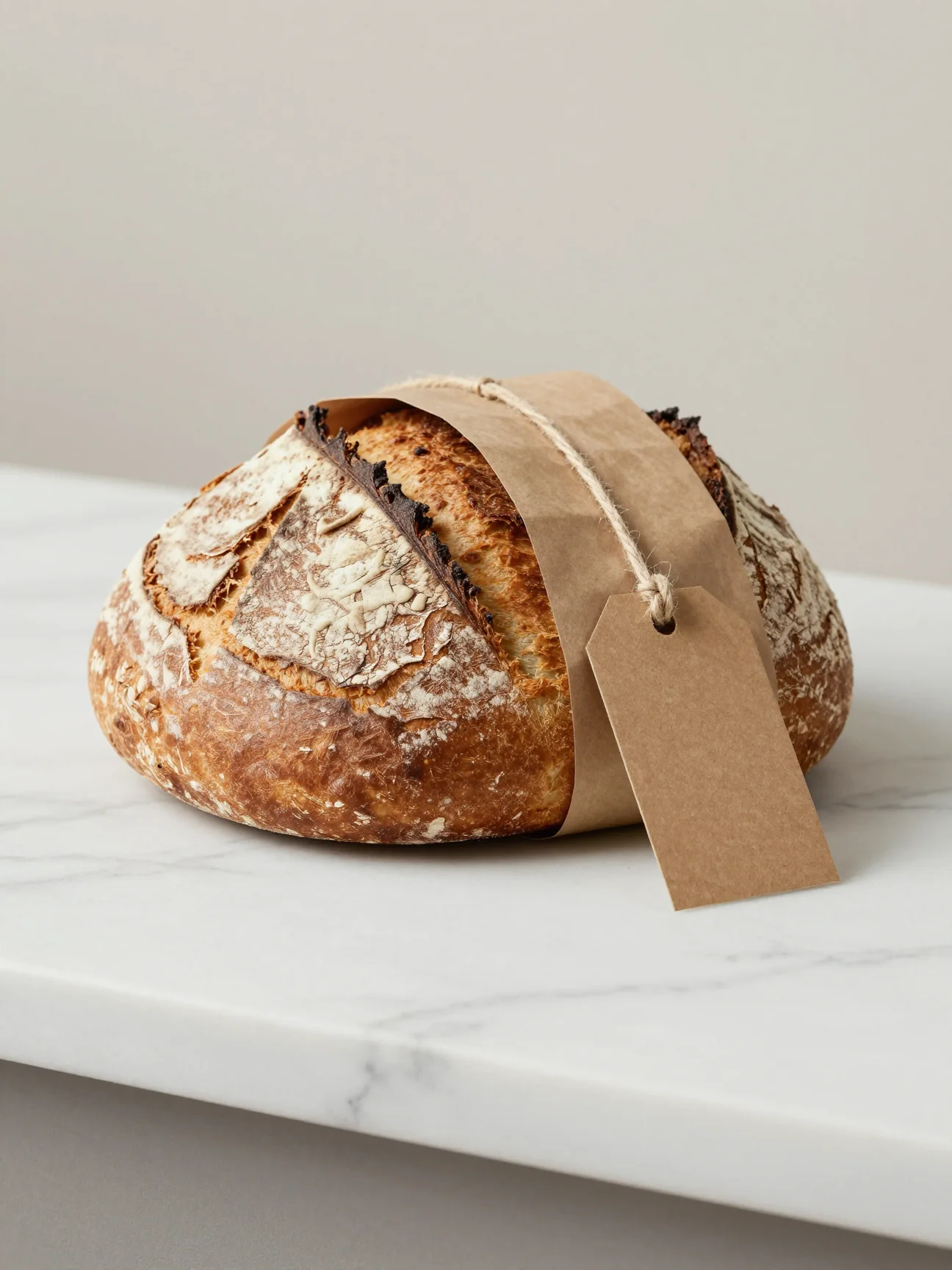
Sourdough loaves with a 24-hour rise, out of the oven at 8:00. Want us to hold one for you? Message us before 11:00.
A fictional bakery. The photo is a Studio sample in Economy quality; the caption is an example draft written in the composer.
Example draft generated with Clautia
- LinkedIn
Northside Physio is extending its hours: from Monday we are also open on Saturdays, 9:00 to 14:00. Book by phone or on our website.
A fictional clinic. The update goes out with a Studio image of a bright treatment room, scheduled for Monday at 9:00.
Example draft generated with Clautia
In this article
How to do it in Clautia, step by step
Open Studio
Go to Studio from your workspace menu (on mobile, it is under More) and press Start on the Image card.
Choose the brand and describe the image
Pick the brand the image is for and write the prompt, up to 280 characters.
Pick the quality and generate
Economy (8 credits) or Standard (22), each with its price next to it. Studio shows the estimated cost, and you press Generate, with the price on the button.
Use it in a post
The image is saved in Media. Use in a post opens the composer with the image attached, and you schedule it from there.
Availability
What Clautia does today and what is coming soon
Available today
- Publish and schedule on 10 networks, Google Business Profile included
- Posts on your Google Business Profile from the same calendar
- AI writing: drafts, adaptation to each network and rewrites on 8 networks, Google Business Profile included (not Bluesky or Telegram yet)
- Unlimited brands on every plan
- Team spaces with owner, admin and member roles
- MCP server and REST API to run Clautia from your AI agent
- Your AI agent and automatic drafts
- AI images
Soon
- Publishing to PinterestSoon
- The clautia command-line toolSoon
- Unified inbox and AI replies to Google reviewsSoon
- Routines for any taskSoon
- Trends and content ideasSoon
- Competitor trackingSoon
- Visibility in ChatGPT, Gemini and Perplexity (GEO)Soon
Frequently asked questions
What is Clautia Studio?
It is the part of Clautia, the agentic social media manager, where you create AI images from a description. It is at version 0.1: it creates vertical 3:4 images in two qualities, Economy and Standard, saves them in Media and lets you use them in a post in one click.
How much does an image cost?
8 credits in Economy quality and 22 in Standard. You see the price before you generate, next to each quality and on the button. Images included in your plan show «Reserved now: 0 credits» and do not touch your balance. The price that counts is always the one the app shows.
How many images does each plan include?
Creator includes 30 a month, Pro 100 and Agency 300, and the 7-day trial includes 3. They cover both qualities and count toward the daily AI limit, which Studio shares with AI writing. Compare plans on Pricing.
Am I charged if the image never arrives?
No. Credits are reserved when you request the image and charged when it is delivered. If it does not arrive, or has not finished after 10 minutes, the credits come back in full. If we cannot tell whether the provider received the request, they are returned automatically after 2 hours.
Does Studio use my brand's tone and colors?
Not yet. You choose the brand the image is for, but Studio does not apply its tone or colors yet; that comes in a later version. Today the image comes from what you write in the prompt.
Does it make video? Can I choose the format?
Not yet. Version 0.1 creates images, and they all come out vertical 3:4. Video and choosing the format arrive with version 0.2, which is on its way. You can follow it on the Roadmap.
Can my AI agent create images in Studio?
Not yet. Studio works from your own session in the app. Through the API, MCP, agents or routines it answers that it is not available, and it spends nothing.
What happens to the descriptions I write?
To create the image, Studio sends your description to our AI provider (named in section 7 of our Privacy Policy). Once the image is in your Media, we ask the provider to delete it: it deletes your description and the image and keeps only a technical record with no content; the image may still sit in its cache for a while. The Studio guide has the details.
Related guides
- Features and networksAn AI image generator for your Instagram posts and the rest of your social mediaCreate AI images for Instagram and your other networks, and turn them into a scheduled post without downloading a thing. See the credit price first.Read the guide
- Features and networksAI social media post generator that writes for each networkDraft, adapt and rewrite social media posts and captions with AI inside Clautia. Credits per plan; posts stay drafts until you schedule them.Read the guide
- Features and networksA social media scheduler for your 10 networks, including Google Business ProfileSchedule posts to 10 networks (Google Business Profile included) from one calendar, with AI, unlimited brands, team roles, MCP and API.Read the guide
Start your 7-day trial with your own brand
From $29/mo + tax · 7-day trial with card · cancel anytime